Method: Sdsdk.decrypt
Description
The decrypt method decrypts data previously encrypted in Zero Trust Data Format (ZTDF).
This method relies on the configuration provided during the instanciation of the Sdsdk class.
The method automatically detects the protocol (kas, symmetric_kas or local_symmetric_kas) from the manifest and verifies if the configured KAS supports it.
symmetric_kas: Online decryption.
The wrapped DEK is sent to the KAS and decrypted using symmetric KEK. 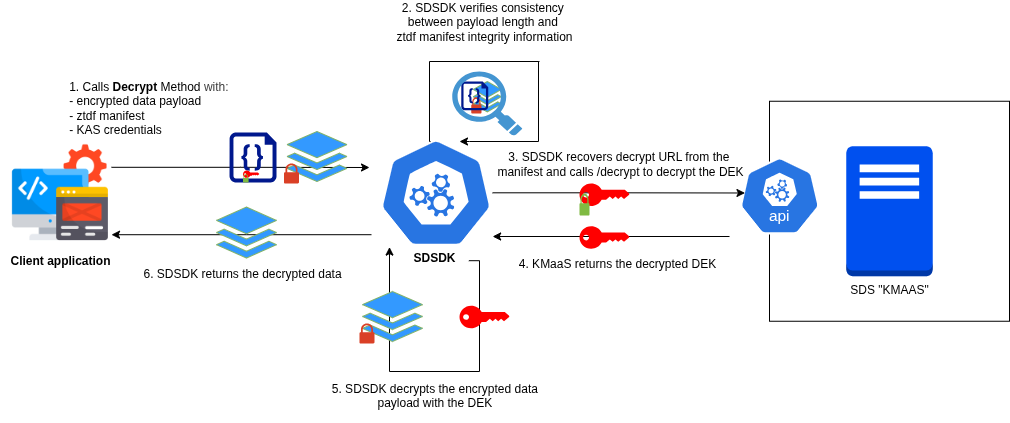
kas: Online decryption.
The wrapped DEK is sent to the KAS and decrypted using its private key KEK. 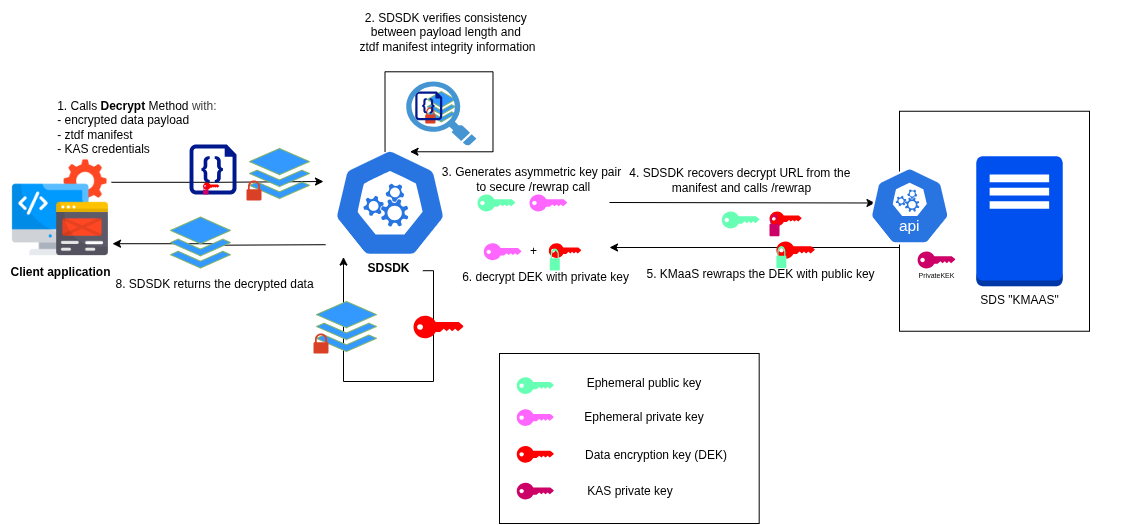
local_symmetric_kas: Offline decryption.
The wrapped DEK is unwrapped with the local KEK. 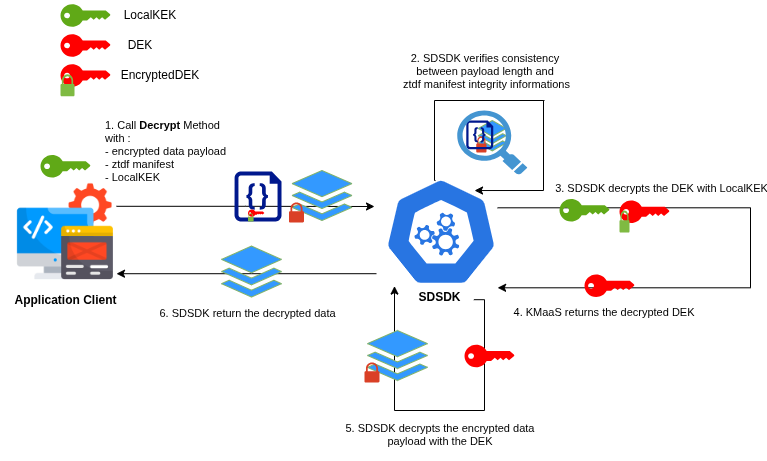
WARNING
Configuration requirements: To succeed, the Sdsdk instance must be initialized with:
- A default KAS URL that matches at least one in the ZTDF manifest.
- For
symmetric_kasandkas: Valid authentication credentials for that KAS. - Support for the protocol used in the matching Key Access Object.
Protocol Handling
The method automatically detects the protocol (kas, symmetric_kas or local_symmetric_kas) from the manifest and verifies if the configured KAS supports it.
symmetric_kas: Online decryption. The wrapped DEK is sent to the KAS which uses its symmetric KEK to decrypt the DEK.kas: Online decryption (with asymmetric local wrapping during encryption). The wrapped DEK is sent to the KAS which uses its private key KEK to decrypt the DEK.local_symmetric_kas: Offline decryption. The wrapped DEK is unwrapped locally with theLocalKasKEK.
Parameters
The method accepts an object containing the ZTDF container.
Ztdf
- Type:
Ztdf - Description: The ZTDF object containing the
manifestand theencryptedData(payload).
Return
Returns a Promise that resolves to the decrypted payload.
data
- Type:
Uint8Array - Description: The decrypted data
How ABAC works
During decryption, the attributes specified during encryption are sent to the KMaaS, which sends them to the policy server (see KMaaS documentation: Using Attribute-based access control (ABAC)). You can write your own rules to authorize or deny decryption.
Note: local_symmetric_kas protocol does not support ABAC.
Multi-KAS decryption
If the data were encrypted with MultiKas encryption, the decrypt method reconstructs the DEK by invoking each KAS. Simply ensure that all required KAS instances are present in the kaslist SdsdkConfiguration.
Examples
With kas or symmetric_kas protocols
javascript
import { Sdsdk, Ztdf } from 'sdsdk';

// 1. Load the encrypted payload (data + manifest) from your storage / transport
const ztdf = await Ztdf.fromZip(await readFile('encrypted-data.zip.ztdf'));

// 2. Setup the SDK with your KAS configuration (URL & Auth)
const sdsdk = new Sdsdk({
  defaultKasId: 'my-kas',
  kasList: [
    {
      id: 'my-kas',
      url: 'https://kas.example.com/api/v1/kas', // Must match the encryption KAS
      protocols: ['symmetric_kas', 'kas'],
      authentication: {
        mode: 'basic',
        value: 'dGVzdEFwaUtleTpvY2dZ...', // Credentials configured here
      },
    },
  ],
});

// 3. Decrypt using the instance configuration
try {
  const result = await sdsdk.decrypt(ztdf);

  console.log('Decrypted data:', new TextDecoder().decode(result.data));
} catch (error) {
  console.error('Decryption failed:', error.message);
}
With local_symmetric_kas protocol
javascript
import { Sdsdk, Ztdf } from 'sdsdk';

// 1. Load the encrypted payload (data + manifest) from your storage / transport
const ztdf = await Ztdf.fromZip(await readFile('encrypted-data.zip.ztdf'));

// 2. Retrieve the KEK (Key Encryption Key) that was used during encryption from your vault
const kek = mySecretManager.getKek(); // Uint8Array (32 bytes)

// 3. Setup the SDK with your KAS configuration (URL & Auth)
const sdsdk = new Sdsdk({
  defaultKasId: 'my-local-kas',
  kasList: [
    {
      id: 'my-local-kas',
      protocols: ['local_symmetric_kas'],
      kek: kek,
    },
  ],
});

// 4. Decrypt using the instance configuration
try {
  const result = await sdsdk.decrypt(ztdf);

  console.log('Decrypted data:', new TextDecoder().decode(result.data));
} catch (error) {
  console.error('Decryption failed:', error.message);
}